The Virtual Site Survey Workflow
July 5, 2026 · 4 min read · SiteOps Command · Updated September 27, 2026
The survey that used to mean a plane ticket, a hardware kit, and a day on site can start from the floor plan already on your screen. Here is the whole workflow, and where a site visit still earns its place. (For the short how-to, see the virtual site survey guide.)
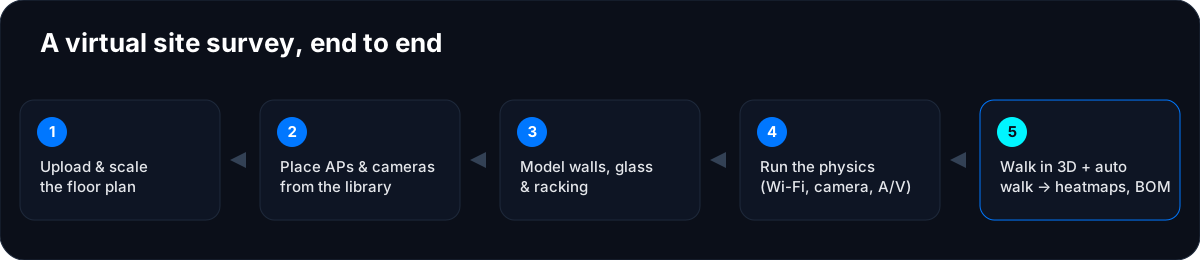
1. Upload and scale the floor plan
Bring in a PDF or an image and set the scale from one known dimension — a door width, a column grid, a dimension string. The plan stops being a picture and becomes a real coordinate space that everything else measures against. Scale first; every number downstream depends on it.
2. Place APs and cameras from the product library
Pull real models with real specifications — antenna gain and beamwidth, lens and sensor, PoE draw — not generic placeholders. The physics runs on the actual hardware you intend to install, so the result reflects the AP and the camera you will quote, not an idealized stand-in.
3. Model the building, not only the room
Draw walls with their materials, glass, and warehouse racking. This is the obstacle model every physics engine reads from — get it right once and Wi-Fi, camera, and A/V all reflow from the same geometry. Change a wall from glass to block and the affected coverage recomputes; you do not re-model the building three times for three disciplines.
4. Run the physics
Standards-grounded Wi-Fi propagation, camera pixels-on-target per zone, and A/V scored per seat — computed from the placed hardware and the obstacles. Read the heatmaps as 2D overlays and on the 3D model. Nothing here is a stock gradient; each figure comes from the datasheet and the geometry. (For the Wi-Fi side, see the physics of an honest heatmap.)
5. Walk it in 3D — and let the survey walk itself
Stand anywhere in the building and read live coverage from that spot: signal, pixels on target, intelligibility. Then let the autonomous virtual site survey walk the space systematically and flag the gaps with physics-backed fixes — the design pass without a Sidekick and without a truck roll. What comes out is the deliverable set: coverage heatmaps, a per-camera point of view, a bill of materials generated from what you placed, and site plan sets — customer-facing and in sync with the design.
The truck-roll math (do your own)
A predictive-plus-validation workflow today often means an Ekahau seat ($4–12K/yr) and a Sidekick kit ($3K), plus travel per site. A virtual pass does the design without the trip, and you validate on site only where it counts. We do not total a savings number for you — your mix, seats, and contracts differ, and inventing one would be dishonest — but the ROI worksheet lets you put your own figures in.
Where an on-site visit still counts
This is not “never visit.” For final validation, RF troubleshooting, or a compliance sign-off, you still measure — radio meets the real world, and the real world has surprises. The point is narrower and more useful: stop paying for a truck roll to produce a design that is, at heart, a computation. Let the model tell you where a visit is worth the trip.
Checklist
- Scale from a known dimension before you place anything.
- Use real library models, not generic devices — the specs are the physics.
- Model materials and racking, not only room outlines.
- Run the autonomous walk to catch gaps you would miss by eye.
- Keep the site visit for validation, not for design.
If you run multi-site rollouts, this is the difference between fifty models and fifty truck rolls. See the MSP workflow, do the math on the ROI calculator, or read why six separate tools make this harder than it needs to be. To try it on your own plan, create a workspace.
Frequently asked
- What is a virtual site survey?
- A predictive site survey done from a floor plan and a model of the building, rather than by walking the space with measurement hardware. It places real devices, models walls and obstacles, and computes coverage for Wi-Fi, cameras, and A/V before anyone visits.
- Can a virtual survey replace an on-site Wi-Fi survey?
- For the design pass, largely yes: a predictive model produces the heatmap and the bill of materials. On-site measurement still matters for final validation, troubleshooting, and compliance sign-off. The virtual pass tells you where a visit is worth it.
- Do I still need a Sidekick or an Ekahau seat?
- You need a way to design and a way to validate. A virtual survey covers the design without the hardware kit; formal on-site validation still means measuring. Many teams find they were buying a kit to do work that is fundamentally a computation.