Features · Project delivery
The same model carries the job from discovery to as-built.
Delivery is where designs usually get retyped into a scheduler, a spreadsheet, and a permit binder that drift apart by week two. Here the phases, the change orders, the submittal package, and the handoff all read the design record — and stay current with it.
The delivery spine
- 01 Requirements adaptive discovery before the visit
- 02 Phases labor, cost, and scope per phase
- 03 Schedule critical path, resources respected
- 04 Changes an enforced, signed lifecycle
- 05 Permits jurisdiction-specific packages
- 06 Handoff as-built from evidence, PDF or CAD
Every step reads the same design record.
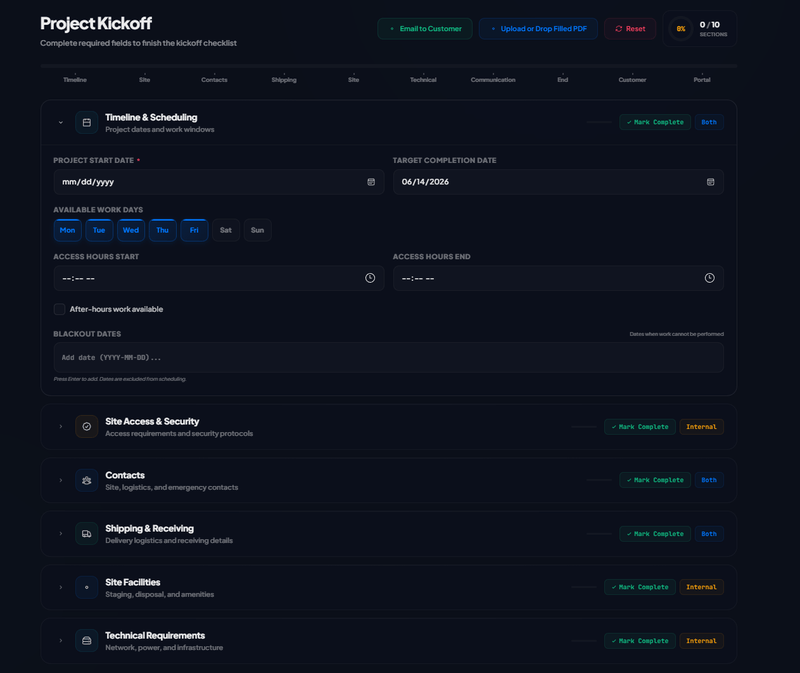
Requirements
Discovery that arrives before the truck does
Delivery goes wrong earliest at discovery. The requirements engine asks what a senior engineer would ask — adaptively, across disciplines — before anyone is on site.
- Twelve discipline packs spanning 133 questions, asked adaptively — answers trigger the follow-ups that matter and suppress the ones that no longer do, across domain boundaries.
- Seven lifecycle stages, from pre-survey discovery through renewal — the right questions for the moment the project is actually in.
- Every answer is classified — fact, assumption, inference, recommendation, or unresolved risk — so the plan distinguishes what is known from what is hoped.
A discovery session
- Adaptive
- answers open and close question paths
- Cross-domain
- a cabling answer can wake a power question
- Classified
- fact · assumption · inference · risk
- Carried forward
- into the design and its documents
Multi-phase & scheduling
A schedule with real math under it
Phases carry the labor, cost, and scope derived from the design — and the schedule underneath them is computed, deterministically, with the standard project-scheduling methods.
- Critical-path analysis with the standard forward and backward pass — earliest and latest dates, total float, and the critical path itself — following the PMBOK method.
- Resource-constrained scheduling on top: tasks placed by priority into the earliest slot where predecessors are done, crews have capacity, and time windows allow.
- An interactive timeline that carries phase aggregates, milestone status, an at-risk summary, a responsibility matrix, and go-live tracking — for the people running the job and the people asking about it.
- Deterministic by construction: the same plan produces the same schedule, every run.
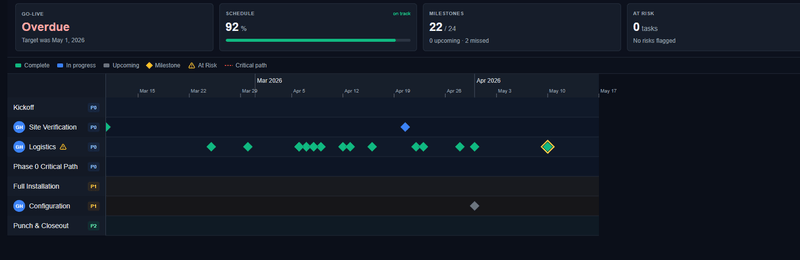
What the schedule knows
- Float
- per task — where the slack really is
- Critical path
- the tasks with none to spare
- Resources
- crew capacity as a hard constraint
- At risk
- surfaced on the timeline, not in a status call
Change orders
Scope changes with a spine
A change order here is not a note in a thread — it is a record with an enforced lifecycle, tied to the phase it changes and the money it moves.
- An enforced state machine — draft, submitted, approved or rejected, revisions back to draft, voiding restricted to admins — with invalid transitions rejected at the data layer.
- Approvals are role-gated, and an approved order’s amounts are locked — the number that was approved is the number that stands.
- Line items compute their own totals, tie to phases, and every transition lands in the audit log.
- Export a signed change-order record — the paper trail your customer and your accountant both want.
One change, tracked
- 01 Draft scoped, priced, tied to its phase
- 02 Submit into the approval path
- 03 Approve or reject role-gated, amounts locked on approval
- 04 Export a signed record of what changed
Invalid transitions are rejected, not discouraged.
Permitting & inspections
Submittal packages the jurisdiction recognizes
Permitting is document assembly against a specific jurisdiction’s expectations — so the package builds from the jurisdiction’s own requirements and the project’s real records.
- A jurisdiction-aware submittal plan: the authority’s requirements, the cited code sections and editions, and the required documents resolved into one typed plan.
- The package assembles from canonical sources — the electrical calculations, the cited compliance requirements, the one-line diagram, and product cut sheets — each derived from the design, none retyped.
- The post-construction closeout package builds from real records: contractor-entered completion data, acceptance tests with actual sign-offs, and installed devices. Fields the records cannot support stay blank — the package refuses to invent.
- Submittal milestones and inspections tracked to close, with fee estimation per jurisdiction.
Inside the package
- Plan
- the jurisdiction’s requirements, typed
- Citations
- code sections with their editions
- Calculations
- electrical, derived from the design
- Closeout
- real sign-offs — blank when absent
Approval stays the jurisdiction’s call — the package just stops being the reason for delay.
Orders & logistics
The gear, tracked from PO to install
Between the approved design and the finished install sits procurement — orders, purchase orders, shipments, and the question of where every device actually is.
- Orders can be linked to the project and to the BOM lines they fulfil, and the link is written on both records.
- Shipment tracking by carrier, so the schedule can see what the supply chain is doing to it.
- An append-only device-movement ledger — received, deployed, returned, retired — that stays auditable because corrections are new entries, never edits.
A device’s paper trail
- 01 Shipped tracked with its carrier
- 02 Received a ledger entry, not a memory
- 03 Deployed installed against the design
Corrections are new entries — the history stands.
As-built & quality
Handoff assembled from evidence
The as-built is not a drawing someone tidies up at the end — it is the accumulated record of what was installed, verified, and signed off.
- One quality record for the project: deficiencies, acceptance exceptions, and sign-offs live together with one history — not in four systems that disagree.
- Camera installs verified against the design view, with design-vs-installed photo pairs carried into the as-built document.
- The as-built exports as PDF or CAD, and a snapshot can publish to the customer portal — the customer’s copy of record.
Closing the job
- 01 Punch list deficiencies tracked to zero
- 02 Acceptance exceptions named, tested, signed
- 03 As-built generated from the record, PDF or CAD
- 04 Published a portal snapshot for the customer
Delivery that reads the design, not a copy of it
- Critical path
- Computed, not eyeballed
- Forward and backward pass with float on every task — resources respected
- Draft → approved
- Change orders, enforced
- Role-gated approvals, locked amounts, a signed record at the end
- Blank when absent
- The closeout rule
- Permit packages assemble from real records — never invented fields
- One model
- Discovery to as-built
- Schedule, changes, permits, and handoff read the same design record
Frequently asked questions
How is this different from running the job in a PM tool?
A project-management tool tracks a description of the job you type into it. Here the schedule, the change orders, the permit package, and the as-built read the design record itself — phases carry the labor, cost, and scope aggregates derived from what is actually placed, and when the design changes, the delivery plane sees it. Nothing is re-keyed into a second system.
Can it guarantee my permit gets approved?
No — approval is always the jurisdiction’s decision, and no software should promise otherwise. What it does: assembles a jurisdiction-specific submittal package with the cited code requirements and editions, the electrical calculations, and the supporting documents, then tracks submittal milestones and inspections so nothing stalls silently.
What happens when scope changes mid-build?
You raise a change order. It moves through an enforced lifecycle — draft, submitted, approved or rejected, with revisions returning to draft and voiding restricted to admins. Approvals are role-gated, an approved order’s amounts are locked, every transition is audit-logged, and the signed change-order record exports with the project.
What actually lands in the as-built package?
The installed reality, assembled from evidence: devices with installed status, design-vs-installed verification photos, the quality record — deficiencies, acceptance exceptions, sign-offs — and the drawings. It exports as PDF or CAD, and a snapshot can publish to the customer portal.
Carry the model through the build
From the first discovery question to the signed as-built — one record, no retyping. Talk to us about what your team needs.