The unified spatial computation engine
One model of the building. Every number computed from it.
Walls, glass, racking, ceilings — modeled once on your real floor plans. Every physics engine reads that same geometry: walk the design in 3D, read the numbers where you stand, and let SOC survey the building before a truck rolls.
One model, many engines
The obstacle model
walls & materials · glass · doors · ceilings · racking · furniture
-
Wi-Fi RF
ITU-R P.2040 · P.526 · P.1238
-
Camera optics
DORI · IEC 62676-4
-
Conference A/V
AVIXA DISCAS · IEC 60268-16
-
Paging
STI · NFPA 72
-
DAS
Coverage on the same model
-
Electrical
NEC
Change the model once — every affected engine recomputes.
Why point tools can't follow
Three things a stitched-together stack can't do
Each one exists because every discipline computes from the same spatial model. Remove that, and none of them work.
01
Unified spatial computation engine
One obstacle model, many physics engines. Change a wall and every affected discipline re-flows.
Read the proof
02
GPS-anchored 3D walkthrough
Stand anywhere and read Wi-Fi, camera, audio, and display numbers — computed from real datasheets.
Read the proof
03
Autonomous virtual site survey
SOC walks the building, checks every discipline against your targets, and flags the fixes. No truck roll.
Read the proof
Proof 01 · Unified spatial computation engine
Change a wall. Watch every discipline re-flow.
The obstacle model is the single source of truth for the building — so an edit to the geometry is an edit to every discipline's inputs at once. What six point tools each approximate separately, the platform computes from one model.
- Walls with real materials, glass, doors, ceilings, warehouse racking, and furniture — modeled once, on your actual floor plans, in 2D and full 3D.
- Each discipline — Wi-Fi RF, camera optics, conference A/V, paging, DAS, electrical — runs its own standards-grounded engine against that same geometry.
- Change a wall material and Wi-Fi coverage, camera shadows, audio, and cable runs re-flow from the same edit. No re-keying across six tools.
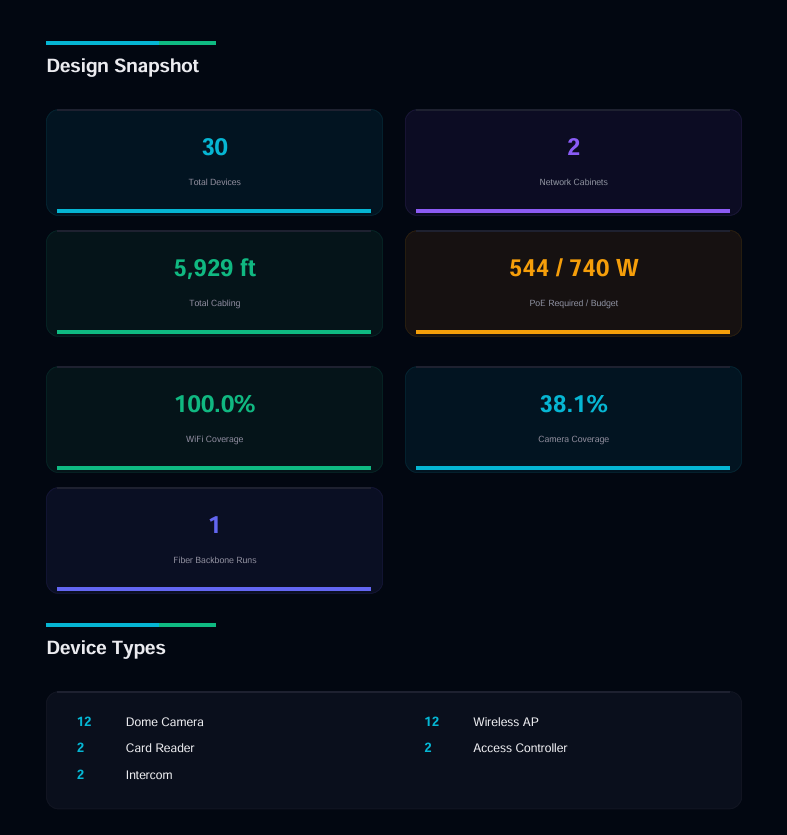
One edit
Wall W-14 · interior
Drywall to Glass
Everything downstream
- Camera shadows re-cast through the new material
- Wi-Fi coverage re-propagated through the wall
- Speech intelligibility re-scored where it changed
- Cable runs re-flowed around the geometry
No exports. No re-keying. One geometry.
What computes on the model
11 disciplines, one geometry
Every engine below reads the same walls, glass, racking and ceilings. Change the geometry once and the ones affected re-compute together — these are the disciplines that re-flow, and the standards each is held to.
Network
Five-tier topology derived from the placed design, MDF/IDF closets, rack elevations in BICSI order, switch-port and patch-panel planning, and suggested VLAN groupings.
Cabling & fiber
Copper and fiber validated against ANSI/TIA-568 distances and TIA-606-D labeling, with cable-route optimization using capstan pull-tension physics and per-closet schedules.
Wi-Fi RF
ITU-R P.2040, P.526 and P.1238 indoor propagation with knife-edge, UTD and Deygout multi-edge diffraction, antenna gain and beamwidth from the product record (equal in every direction where no beamwidth is on file), and channel planning including DFS eligibility and 6 GHz channels; AFC availability is not evaluated yet.
DAS / LTE cellular
Downlink RSRP and SINR per zone and uplink margin against source sensitivity (3GPP TS 36.214 and 36.213), passive-intermodulation screening to IEC 62037, the FCC Part 20 oscillation-isolation rule, plus feeder-tree solving, capacity modeling and a DAS bill of materials.
Cameras
DORI pixels-on-target per zone to IEC 62676-4, per-camera 3D point of view, fisheye and panoramic projection, IR reach from the datasheet rating, and shadow casting from walls, glass and racking.
Access control
Doors modeled with hardware, handing, fire rating and ADA state, reader/controller/REX and lock modeling, controller capacity read from the product library, power-supply sizing from summed load, and egress checks.
Conference A/V
AVIXA DISCAS display sizing and IEC 60268-16 speech intelligibility scored per seat, with microphone signal-to-noise and camera framing assessed against the room geometry.
Paging & voice alarm
Speaker layout and coverage for paging and voice-alarm notification, with intelligibility assessed on the same geometry as the rest of the design.
Sound masking & privacy
Vendor-constrained sound-masking auto-design, evaluated for speech privacy rather than intelligibility — the inverse objective to paging, on the same model.
Electrical & power
IEEE 802.3af/at/bt PoE budgets with power and port headroom, NEC circuit sizing, UPS runtime as a labeled estimate, and BTU/thermal against ASHRAE envelopes. Voltage drop computes through the Solutions Copilot tools and is reported as not computed in the design panel rather than shown as a placeholder. Arc-flash screening is not covered: a stamped study belongs to a licensed engineer.
Location readiness
GDOP geometry scoring as a floor-plan grid showing where the access-point layout supports meter-class positioning, plus roaming handoff quality on the placed access points. It scores the geometry positioning depends on rather than locating devices at run time; Passpoint onboarding readiness is on the roadmap.
The commercial, delivery and platform planes read the same model — see the capabilities overview.
What one model makes possible
Two systems can both pass, and still defeat each other
Every discipline above can satisfy its own design rules and still be broken by a neighbour. That failure is invisible to any tool that models one discipline at a time, because nothing in it is wrong on its own — the conflict only exists in the space between them.
Wi-Fi ↔ DAS
A cellular remote and a Wi-Fi radio sharing a ceiling can desense each other through co-channel overlap, adjacent-channel leakage, or intermodulation products landing in the wrong band.
ITU-R SM.1541 · 3GPP TS 36.104
Voice alarm ↔ sound masking
Masking exists to destroy speech intelligibility and voice alarm exists to guarantee it. On the same ceiling they overlap in band, arrive at different times, and comb-filter — so the emergency message loses to the privacy system.
IEC 60268-16
Electrical → RF
Variable-frequency drives and conducted emissions raise the noise floor a Wi-Fi or cellular link is trying to work above, and power cable run alongside RF cable couples into it.
IEEE C62.45 · ITU-R SM.1541
Electrical → audio
Ground loops and 60 Hz hum couple from power into audio pathways — the classroom speaker that buzzes for reasons no audio drawing can explain.
IEEE C62.45
Spatial conflict
Low-voltage run too close to power, conduit over capacity, forbidden adjacency. Checked against the separation rules rather than against whether two lines happen to cross on a drawing.
NEC 300.3 · NEC 800.133 · TIA-568
Conflicts are found on every analysis, carry a severity that counts against the design rather than sitting in a footnote, and feed the remediation list — so a design that quietly defeats itself does not come back clean. This is not collision detection: none of these systems need to touch.
Proof 02 · GPS-anchored 3D walkthrough
Stand anywhere. Read every number.
The model is anchored to the building's real coordinates: where you stand in the walkthrough is where you'd stand on site. Walk it in first person and read what every discipline delivers at that exact position — the site walk you wish you could do before the site exists.
- Live readouts, every discipline at once: Wi-Fi signal strength, camera pixels-on-target, speech intelligibility, display sizing.
- Computed from the product library — antenna gain, lens and sensor specs, IR range, speaker output.
- The proof travels: coverage heatmaps, per-camera POV reports, and print-ready site plan sets come from the same model.
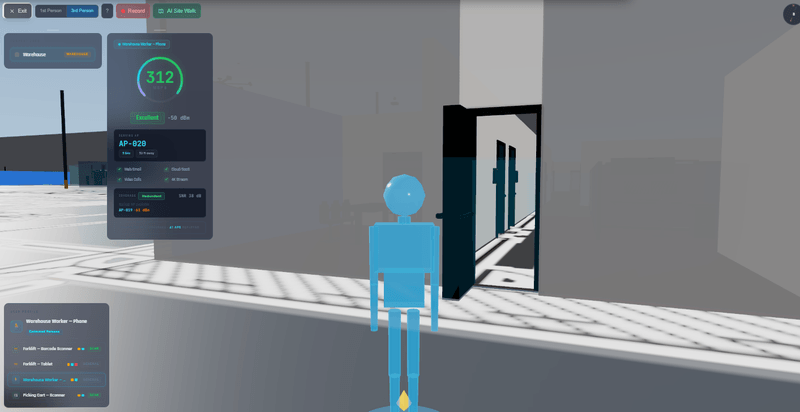
Position readout — anywhere you stand
- Wi-Fi signal
- dBm at your position · ITU-R propagation
- Camera coverage
- pixels-on-target vs DORI · IEC 62676-4
- Speech
- intelligibility (STI) · IEC 60268-16
- Displays
- sized to the viewer · AVIXA DISCAS
Figures start from the product record — antenna gain, lenses, IR range, speaker output.
Proof 03 · Autonomous virtual site survey
SOC walks the building, so you don't have to.
Point SOC at the model and it walks the building like a surveyor — floor by floor, discipline by discipline — checking what each position gets against your targets and flagging what falls short, with the fix it suggests. Design validation without booking a flight or renting a survey kit.
- Evaluates coverage against your targets across every floor of the model.
- Returns a punch list: what falls short, where, and the suggested fix — you review and apply.
- Re-run after every design change — validation is a re-run, not a return visit.
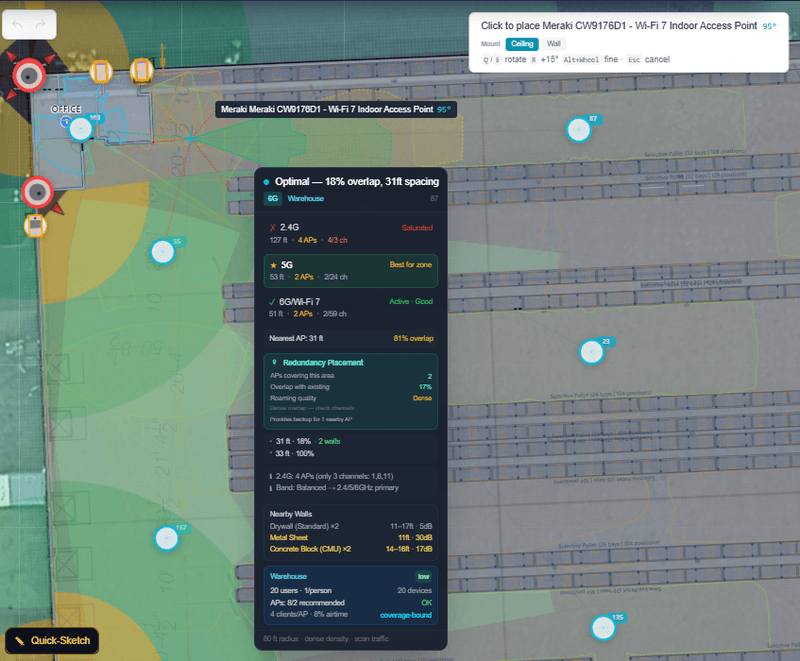
A virtual survey run
- 01 Traverses every floor of the model, discipline by discipline
- 02 Checks what each position gets against your coverage targets
- 03 Flags the gaps, with the fix it suggests
- 04 You review, apply, and re-run
No survey kit. No truck roll.
What the fragmented stack costs you
Tool figures below are what buyers pay for the point tools today — your current spend, never our price.
- One model
- Entered once, read by every engine
- No exports, no re-imports, no version drift between tools
- $4–12K/yr
- What an Ekahau seat costs today
- Plus the $3K Sidekick kit the virtual survey replaces
- $5–15K
- What AFMG EASE costs today
- Conference and paging assessment run on the same model here
- 6 → 1
- Point tools consolidated
- Ekahau · IPVM · EASE · System Surveyor · ConnectWise · DocuSign (e-signature coming soon)
The trust architecture
SOC never invents the numbers.
Not a policy — an architecture. The deterministic physics and cost engines own every figure on every deliverable; SOC researches, suggests, and explains. The boundary is structural: physics figures come only from the engines, and SOC explains them — it cannot author them.
What SOC does
- Reads your documents, orders, and datasheets into structured product and project data — with provenance.
- Researches products and enriches your library from cited sources.
- Walks the model, flags coverage gaps, and suggests the fix.
- Explains what was computed and from which standards, datasheets, and assumptions.
What SOC never does
- Never generates a physics figure — signal strength, pixels-on-target, intelligibility, and sizing come only from the deterministic engines.
- Never papers over a missing spec — unknowns stay visible as unknowns, not guesses.
- Never silently applies a change — SOC suggests; you review and approve.
The universal comparison
One platform vs. the six-tool stack
Capability for capability — the closest equivalent to the platform is six subscriptions stitched together.
| What you need | SiteOps Command | The six-tool stack |
|---|---|---|
| Wi-Fi RF design & survey | ✓ | Ekahau + Sidekick |
| Camera coverage & pixels-on-target | ✓ | IPVM Calculator |
| Conference audio & display assessment | ✓ | AFMG EASE |
| Survey documentation & site plans | ✓ | System Surveyor |
| Renewals, orders & AR | ✓ | ConnectWise |
| E-signature | Coming soon, not live yet | DocuSign |
| One shared building model across every discipline | ✓ | — |
| GPS-anchored 3D walkthrough with live readouts | ✓ | — |
| Autonomous virtual site survey | ✓ | — |
Even with all six on the shelf, the parts that matter most have no equivalent: the unified physics model, the GPS-anchored walkthrough, and the autonomous survey exist because every discipline computes from one geometry — and that is precisely what six separate tools can never share.
See the full six-tools comparisonBeyond design
The same model carries the whole job
The engine leads; the lifecycle follows. Design data flows into scope, install, and the commercial records without re-keying — the as-built you close with is the design you sold.
Built for the way you deploy
Start from your own workflow — each solutions page leads with the pain, the tools it displaces, and how the platform runs your job end to end.
Frequently asked questions
Does SOC generate the coverage numbers?
No. The deterministic physics and cost engines own every figure — Wi-Fi propagation, camera pixels-on-target, speech intelligibility, display sizing, and pricing are computed from your building model and manufacturer datasheets. SOC researches, suggests, and explains; it never invents a number.
Which standards does the physics follow?
Wi-Fi RF propagation follows ITU-R P.2040, P.526, and P.1238. Camera coverage is scored as pixels-on-target against DORI (IEC 62676-4). Speech intelligibility uses STI (IEC 60268-16), with NFPA 72 in view for paging. Display sizing follows AVIXA DISCAS, and electrical work references NEC.
Is this a simulation of the finished building?
It is design-stage estimation, and the platform labels it that way. Coverage is computed from your obstacle model and real manufacturer datasheets — strong enough to catch problems before install, honest enough not to claim it replaces an as-built field measurement. Field verification workflows are built in for install time.
Do the disciplines really share one model?
Yes — that is the architecture. Walls and their materials, glass, ceilings, racking, and furniture are modeled once; each discipline then runs its own engine against that same geometry. Change the geometry and the affected engines recompute. There is no export, re-import, or re-keying between tools.
Is SiteOps Command a CRM?
The platform carries the commercial side — renewals, orders, invoices, and receivables — so the model that wins the job also runs it. The lead is the engine: unified physics, the 3D walkthrough, and the autonomous survey. If you are comparing CRMs, see the ConnectWise comparison.
How do I evaluate it on my own building?
Book a demo and bring your own floor plans — we will design a floor, walk it in 3D, and run the virtual survey on it live. Prefer to explore alone? A sample project is available in the app the moment you sign up.
Walk your next site before it exists
Bring your own floor plans — design a floor, walk it in 3D, and run the virtual survey on it. Talk to us about what your team needs.