Features · Field operations
Built for the aisle, not the office
The design that was walked in 3D is the plan the tech installs against — on a phone, in an aisle, with photo proof. Field ops is the supporting plane that closes the loop between what was designed and what actually went on the wall.
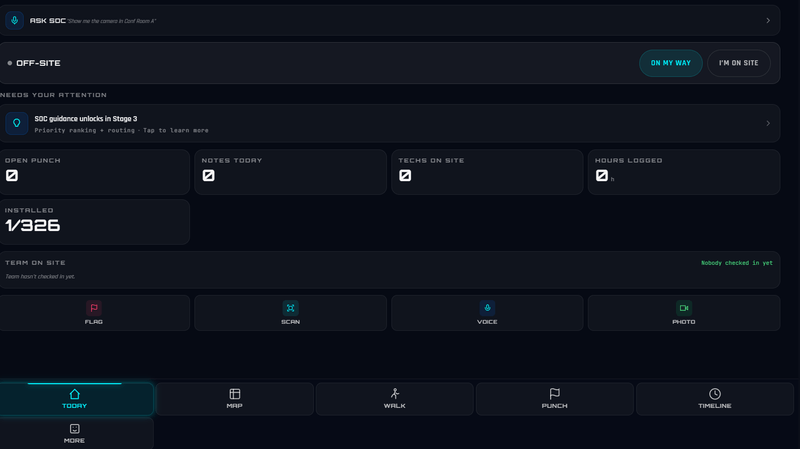
Plans & tasks on site
The plan, in a pocket
The floor plan a tech opens in the aisle is the live design — device positions, floors, and task state from the same model the job was sold on. Not a printout, not a photo of a drawing: the record itself, sized for a phone.
- Floor plans and device positions straight from the live design
- Task and install views built for a phone held in one hand
- Phones and tablets first — the desktop stays at the desk
In the tech’s hand
- Plan
- the live design, per floor
- Tasks
- what to install, where
- Device
- position, model, mount
- Format
- phone-first, one hand
Install verification
Install proof, not install hope
Every device install is tracked against the design — the designed position and the designed device — with photos captured as gear goes in. Verification pairs the design view with the installed view, and the evidence flows into the as-built package at closeout.
- Install tracking device-by-device against the designed position
- Photo capture and verification against the design as devices go in
- Verification photos carry through to the as-built deliverable
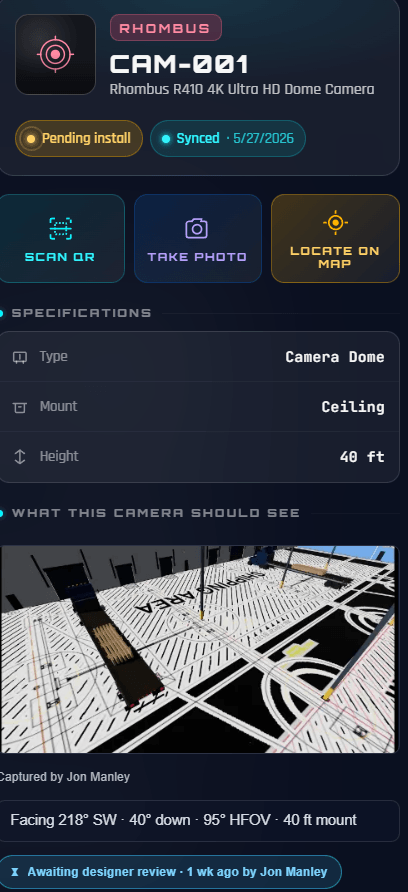
Per device
- Designed
- position and model, from the plan
- Installed
- photo captured on site
- Verified
- design and install, paired
- Closeout
- flows into the as-built
Field-network reality
Honest about the network
Job-site LTE drops mid-walk — the surface is built for that instead of pretending otherwise. Connection and pending-write status stay visible on screen, and walk and install records ride a server-tracked job flow that survives drops and restarts.
- Connection and queue state visible at all times — degrade visibly, never silently
- Walk and install records on a server-tracked job flow that survives drops and restarts
- The tech always knows what has synced and what is still pending
When the signal dips
- Status
- connection state on screen
- Queue
- pending writes, counted
- Records
- server-tracked, crash-safe
- Silent loss
- designed out
Field facts
Structural facts about the field surface — no invented reliability or speed figures.
- Phone-first
- built for the job site
- phones and tablets, one-handed
- Photo-verified
- installs checked against the design
- device by device
- Visible
- connection and queue state on screen
- degrade visibly, never silently
- Crash-safe
- walk and install records survive drops
- server-tracked jobs, not hopeful writes
Field operations questions
Does it work when the network drops?
The surface is honest about it: connection and pending-write status are always visible, and walk and install records ride a server-tracked job flow that survives drops and restarts. The tech always knows what has synced — nothing is lost silently.
What does photo verification actually verify?
Each install is tracked against the designed device and position, with photos captured as gear goes in. Verification pairs the design view with the installed view, and the evidence flows into the as-built package at closeout.
What hardware do techs need?
A phone or tablet they already carry. The surface is phone-first — plans, tasks, installs, and photo capture are sized for one-handed use on site.
Where does the field data end up?
On the project record. Install status, verification photos, and walk results land on the same model the job was designed on — and the as-built is generated from that model, so closeout documents what happened instead of reconstructing it.
Put the design in the field
Plans, tasks, and photo-verified installs on the device the tech already carries.