Why Racking Wrecks Warehouse Wi-Fi
July 5, 2026 · 2 min read · SiteOps Command
Most predictive tools treat a warehouse like an empty box. Then the pickers cannot scan in aisle 14.
A warehouse is the hardest RF environment an integrator designs, and the reason is the thing the box model ignores: the racking.
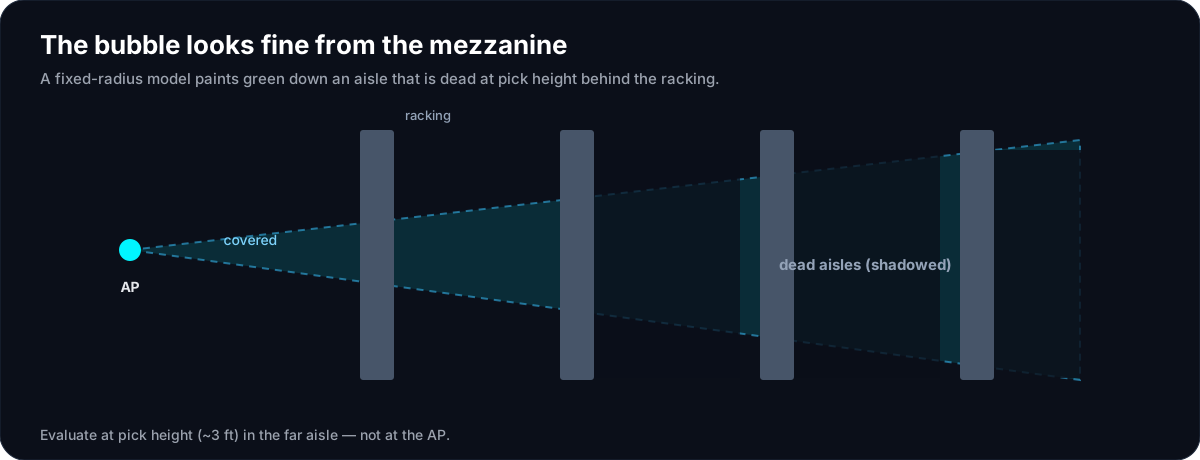
Racking is not empty space
Twenty-foot steel uprights, cross-bracing, and pallets of product are between your access point and the scanner. How much signal survives depends on the depth (how many racks the path crosses), the angle of incidence, and the height at which you measure. A fixed radius drawn on the plan knows none of that.
The bubble lies over the aisle
The classic failure: a coverage circle shows solid green down an aisle that is dead at pick height. Up near the ceiling, above the top of rack, the line of sight to the AP is open; down where the handheld actually sits, the signal has crossed two racks of stacked product. The heatmap that looks perfect from the mezzanine is the one the scanners fail in the aisle.
Model the rack, not only the room
Honest warehouse RF treats racking as a first-class obstacle: material loss via ITU-R P.2040, diffraction via P.526, with the rack carrying real depth, angle, and height — and it runs the statistical ITU-R P.1238 model too, because a warehouse has a higher path-loss exponent than an office from all that aggregate clutter. Take the more conservative of the two so the aisle that matters is not oversold. (More on the propagation side in the physics of an honest heatmap.)
Design for pick height and the far aisle
Two rules carry most of the win: evaluate coverage at client height — roughly three feet, where the device is — not at the ceiling; and check the worst aisle, farthest from the AP and deepest in the racking, not the open floor by the dock.
The physics owns the number; SiteOps Command computes it from the racking, the materials, and the geometry, and shows it on a heatmap. See the method on the coverage physics page.
A short checklist
- Model racking with real depth and height, not as open floor.
- Evaluate coverage at pick height (~3 ft), not at the ceiling.
- Check the worst aisle, farthest from the AP.
- Design to the conservative of the discrete and statistical models.
- Validate on site in the aisles that matter.
Racks are the reason warehouse Wi-Fi is its own discipline. For the standards behind it, read the physics of an honest heatmap; for the workflow at scale, how MSPs use it or the Ekahau comparison; or book a demo on your own warehouse plan.
Frequently asked
- Why is warehouse Wi-Fi so hard?
- Steel racking and stored product attenuate and block RF far more than office drywall, and the effect depends on rack depth, angle of incidence, and height. Coverage that looks fine at ceiling height can be dead at pick height in the aisle.
- How much does racking attenuate Wi-Fi?
- It varies with depth, angle, frequency, and what is on the shelves; the point is that it is significant and cannot be ignored. A model that treats racking as empty space overstates coverage down the aisles.
- How do you design Wi-Fi for a warehouse?
- Model the racking as a real obstacle, compute propagation with material and diffraction physics plus a statistical model for the clutter, evaluate at client (pick) height in the worst aisle, and validate on site.